Black Superbike AI Video Prompt: Create a Cinematic Night Ride
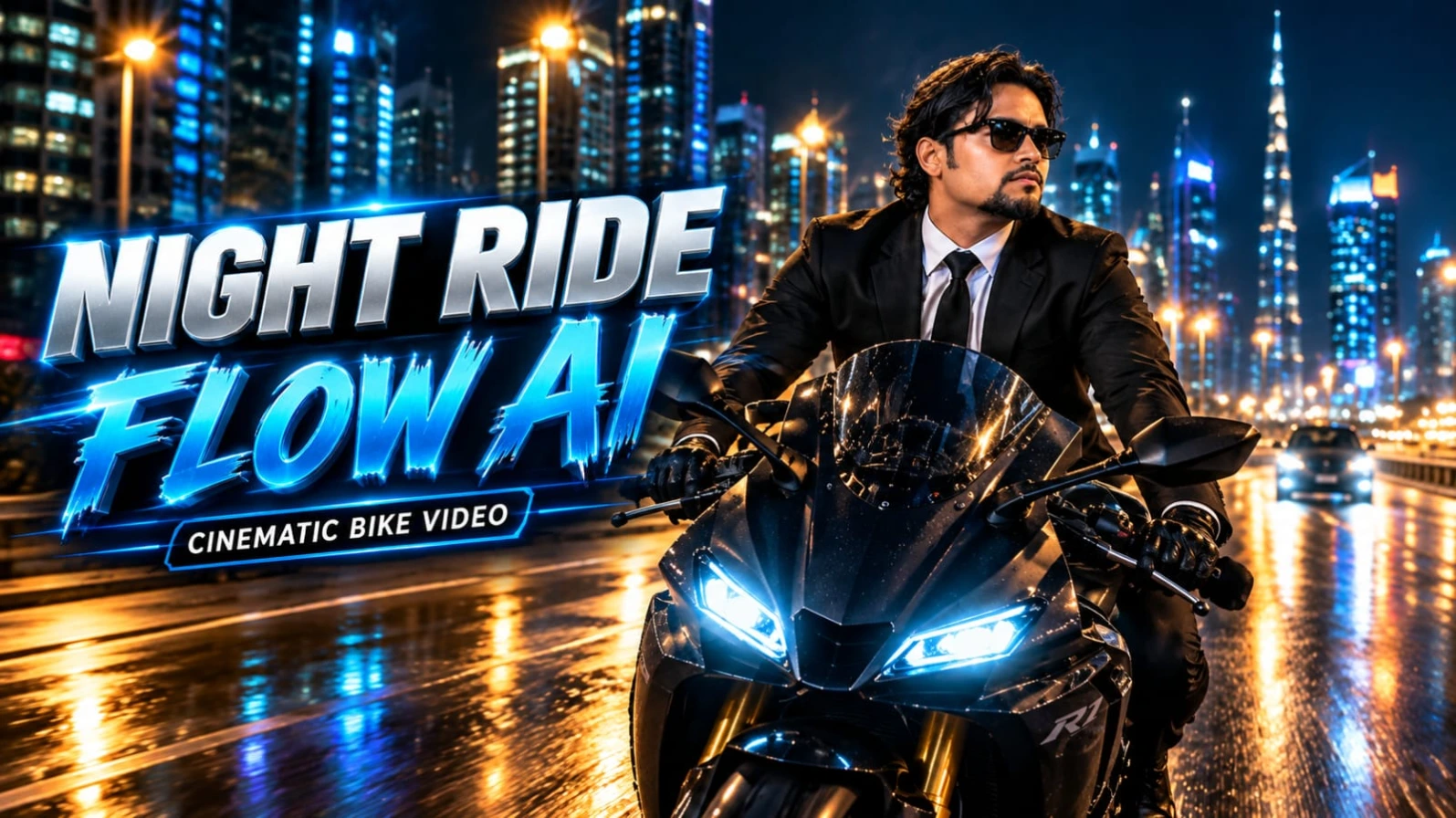
AI video generation has made it easier for creators to experiment with cinematic motorcycle scenes, dramatic lighting, and realistic urban environments. This Black Superbike AI Video Prompt is designed for anyone who wants to create a stylish night-riding video featuring a South Asian man in a tailored black suit riding a matte black sports superbike through an illuminated modern city highway.
The concept combines premium motorcycle styling, confident character presentation, bright LED headlights, neon city lights, and dynamic tracking shots. The result aims for the atmosphere of a live-action action film, with natural road reflections, realistic motion blur, and a dark cinematic colour palette.
This prompt can be used with Flow AI or another compatible AI video generator that supports detailed text instructions. It is especially suitable for vertical content created for Instagram Reels, YouTube Shorts, Facebook Reels, and other mobile video platforms.
What Makes This Superbike AI Video Prompt Special?
The main strength of this prompt is its attention to both the rider and the environment. The rider is not simply sitting on a motorcycle. His clothing, facial appearance, riding posture, and calm expression all contribute to the visual identity of the scene.
The matte black superbike complements his tailored black suit, while the crisp white dress shirt creates contrast. Black leather biker gloves complete the outfit, and the absence of a helmet or face covering keeps his face, hairstyle, and sunglasses visible as requested.
The environment is equally important. A modern city highway at night provides illuminated skyscrapers, streetlights, neon reflections, and moving traffic. These details make the scene feel expansive and cinematic rather than like a stationary motorcycle portrait.
The prompt also specifies several camera perspectives. A backward-facing tracking shot introduces the rider, low-angle side tracking shots highlight the motorcycle and city architecture, and a wide rear-follow shot captures the bike accelerating into the night. Together, these movements create a more varied cinematic sequence.
Character Appearance and Styling
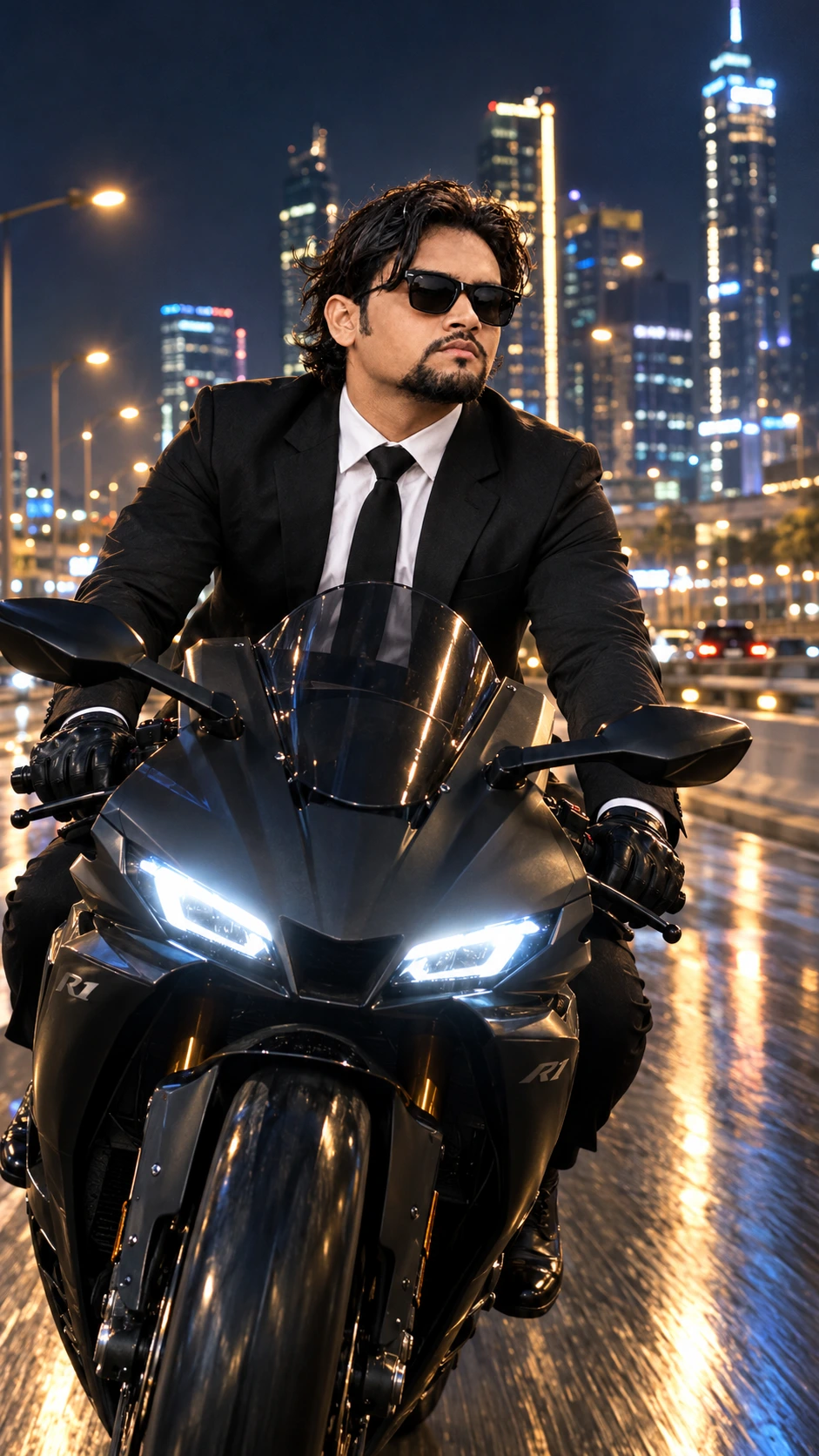
The main character is a handsome South Asian man with medium wavy dark hair blowing freely in the wind, a groomed goatee beard, and black Wayfarer sunglasses. He wears a tailored black suit jacket, crisp white dress shirt, black necktie, black trousers, and black leather biker gloves.
His expression is calm, confident, and dominant. This restrained expression helps create the sophisticated mood of the video. Rather than using exaggerated facial expressions, the rider maintains a composed look as the motorcycle moves through the city.
The instruction “No helmet, no face covering” is a defining part of the requested visual concept. It ensures that the prompt directs attention toward the rider's face and hairstyle. However, this is a stylized fictional scene; real-world motorcycle riding should always follow applicable helmet and road-safety requirements.
For improved character consistency, keep the same appearance description throughout your generation process. If your selected AI tool supports reference images, you may use a suitable character reference to guide the hairstyle, beard, sunglasses, and clothing. Results can vary, so check that the face and outfit remain consistent across the finished video.
The Matte Black Sports Superbike
The motorcycle is the second main subject. A sleek matte black sports superbike gives the scene an aggressive, modern silhouette without distracting from the rider.
Its sharp twin LED headlights beam brightly forward, creating a strong visual focal point in the front tracking shots. In the rear-follow shot, glowing red LED taillights cut through the darkness and provide a contrasting colour accent.
The motorcycle should maintain consistent proportions, bodywork, wheel placement, and lighting throughout the sequence. AI-generated footage can sometimes change vehicle details between frames, especially during fast movement. Reviewing the bike carefully helps identify these inconsistencies.
The matte black finish works particularly well with the night setting. It absorbs much of the surrounding light while reflecting subtle highlights from streetlights, neon signs, and illuminated buildings. This combination creates a premium cinematic appearance.
Dynamic Camera Movement
Camera movement is one of the most important parts of this prompt. The opening shot uses a dynamic backward tracking movement in front of the rider. The camera maintains focus on his face and the motorcycle's front while the city highway moves behind him.
The next shots move to a low-angle side perspective. These shots highlight the bike's shape, the rider's clothing, and the illuminated city skyline. Streetlights and skyscrapers move through the background, creating a sense of speed and depth.
The final wide rear-follow shot captures the motorcycle accelerating through night city traffic. Red LED taillights remain visible as the rider moves farther into the urban environment.
Each camera angle serves a different purpose. The front tracking shot introduces the character, the side shots emphasize the motorcycle and setting, and the rear-follow shot delivers a strong closing image.
If your video generator struggles to create several camera angles in one continuous clip, consider generating each shot separately. You can then combine the clips in a video editor, matching the lighting, character appearance, and motorcycle details as closely as possible.
Night City Lighting and Realistic Motion
The city environment provides the atmosphere that makes this video distinctive. Illuminated skyscrapers, highway streetlights, and neon signs create a layered background filled with colour and depth.
Natural asphalt reflections help connect the motorcycle to the road. Light from headlights and streetlights can appear across the road surface, especially where the asphalt is slightly reflective. These reflections should look integrated with the environment rather than like artificial glowing lines.
Authentic motion blur adds a sense of movement to the passing city lights and background traffic. The rider and the motorcycle should remain sufficiently clear to preserve the main subject while the background communicates speed.
Cinematic rim lighting can highlight the rider's shoulders, hair, suit, and the edges of the motorcycle. True film grain adds a subtle film-inspired texture. Both effects should remain restrained so that the video maintains a live-action appearance instead of looking heavily processed.
The prompt requests a 35mm lens look and 24 frames per second. These terms help describe the desired visual style, but AI tools may interpret them differently. Actual output frame rate and resolution depend on the generator and its available settings.
Complete Master Video Prompt
Use the following prompt as the main instruction for your AI video generator.
Master Video Prompt
Cinematic 9:16 vertical 4k live-action video shot on 35mm lens, 24fps. No helmet, no face covering. A handsome South Asian man with medium wavy dark hair blowing freely in the wind, a groomed goatee beard, and black Wayfarer sunglasses, riding a sleek matte black sports superbike at night through a modern illuminated city highway. He wears a tailored black suit jacket, crisp white dress shirt, black necktie, black trousers, and black leather biker gloves.
The camera dynamically tracks backward in front of him: his expression is calm, confident, and dominant while the superbike's sharp twin LED headlights beam brightly forward. Low-angle side tracking shots show illuminated skyscrapers, highway streetlights, and city neon glowing with authentic motion blur. Wide rear follow shot tracking the bike accelerating through night city traffic, glowing red LED taillights cutting through the dark. Natural asphalt reflections, cinematic rim lighting, true film grain, authentic live-action realism.
Recommended Settings for Better Results
If your chosen video generator supports vertical aspect ratios, select 9:16 for a mobile-first video. The prompt requests a 4K visual style and 24fps, but actual output quality depends on the model and export settings. Writing “4K” in a prompt does not automatically guarantee native 4K resolution.
For a short social media video, a duration that allows the front, side, and rear-follow shots to read clearly is a useful starting point. If the generator supports reference images, use consistent references for the rider and motorcycle where appropriate.
Keep the action focused on riding through a modern city highway. Avoid adding unrelated stunts, sudden scene changes, or extra camera movements that could make the sequence less coherent.
Review the generated video for changing facial features, warped sunglasses, distorted fingers, unstable wheels, inconsistent headlights, and unnatural road movement. If one issue appears repeatedly, refine the prompt to address that specific issue rather than rewriting everything at once.
Final Thoughts
This Black Superbike AI Video Prompt combines fashion, motorcycle design, nighttime architecture, and dynamic cinematography into one cohesive visual concept. Its main strengths are the clearly defined rider, matte black superbike, twin LED headlights, multiple tracking angles, and realistic urban lighting.
Use the prompt as a starting point, test it in your chosen AI video generator, and refine the results according to the tool's capabilities. With careful scene planning and consistent visual details, you can work toward a polished cinematic night-riding video for your next creative project.
Pehle Character Sheet Photo Banaai ChatGPT Se

Flow AI Se Black Superbike Cinematic Video Kaise Banaye
Agar aap ek stylish South Asian man ko matte black superbike par night city highway mein ride karte hue dikhana chahte hain, to Flow AI mein detailed video prompt use karke is concept ko generate karne ki koshish kar sakte hain. Is tutorial mein video setup, prompt selection, camera shots aur final editing ka process step by step samjhaya gaya hai.
Step 1: Flow AI Open Karein
Sabse pehle Google par Flow AI search karein aur Google ke official Flow platform ko open karein. Zarurat ho to apne Google account se sign in karein. Available models, video features aur generation limits aapke account aur current interface par depend kar sakte hain.
Video creation ya text-to-video generation ka option select karein. Agar interface mein model selection, aspect ratio, reference images ya duration ke controls available hon, to apni video ke hisaab se settings choose karein.
Step 2: Master Video Prompt Copy Karein
Is article ke Discussion section mein diya gaya complete Master Video Prompt copy karein. Ismein rider ki appearance, matte black superbike, city highway, twin LED headlights, camera movements aur cinematic lighting ki details di gayi hain.
Prompt paste karte waqt main details ko unchanged rakhein. Agar aap motorcycle, outfit ya camera movement ki important information hata dete hain, to generated video intended concept se alag ho sakti hai.
Step 3: Vertical Video Settings Choose Karein
Agar Flow mein aspect ratio ka option available hai, to 9:16 vertical format select karein. Yeh format Instagram Reels, YouTube Shorts aur doosre mobile-first platforms ke liye suitable hai.
Prompt mein 4K aur 24fps likha gaya hai. Lekin actual resolution aur frame rate selected model aur export settings par depend karte hain. Agar native 4K output available nahi hai, to highest suitable quality select karein.
Step 4: Rider Ka Look Set Karein
Prompt mein medium wavy dark hair, groomed goatee, black Wayfarer sunglasses aur tailored black suit ka description diya gaya hai. White shirt, black tie, black trousers aur leather biker gloves ko bhi consistent rakhein.
Agar Flow ke current workflow mein reference images ka option available hai, to ek suitable character reference use kar sakte hain. Isse visual consistency guide karne mein madad mil sakti hai, lekin exact facial consistency guaranteed nahi hoti.
Generation ke baad check karein ki face, sunglasses, hairstyle aur clothing natural dikh rahe hain.
Step 5: Front Tracking Shot Generate Karein
Pehle shot mein camera rider ke saamne se backward track karta hai. Motorcycle ki twin LED headlights bright dikhni chahiye aur rider ka expression calm aur confident rehna chahiye.
Prompt mein camera movement ko clearly describe karein. Agar output mein camera bahut shake karta hai ya rider ka face distort hota hai, to movement ko smooth aur controlled rakhne ki instruction add karein.
Step 6: Side Tracking Aur City Lights Add Karein
Agla shot low-angle side tracking perspective ka hai. Ismein matte black superbike ki body, rider ka suit aur background mein illuminated skyscrapers dikhne chahiye.
Highway streetlights aur neon signs background mein natural motion blur ke saath move kar sakte hain. Motorcycle aur rider ko itna clear rakhein ki unki shape aur appearance samajh aaye.
Agar Flow ek hi clip mein multiple camera angles ko accurately generate nahi kar raha, to front aur side shots ko alag clips mein generate karne ka option consider karein.
Step 7: Rear Follow Shot Banayein
Final shot mein camera motorcycle ke peeche se follow karta hai. Bike night city traffic ke through accelerate karti hai aur red LED taillights darkness mein visible rehti hain.
Is shot mein bike ka rear design aur taillights consistent hone chahiye. Agar motorcycle ka shape ya lights badal rahi hain, to prompt mein vehicle consistency aur stable rear-follow composition ko aur clearly describe karein.
Step 8: Lighting Aur Realism Check Karein
Video generate hone ke baad asphalt reflections, rim lighting, film grain aur background motion ko review karein. Road par reflections city lights ke saath naturally blend hone chahiye.
Check karein ki wheels rotate kar rahe hain, motorcycle road ke saath properly aligned hai aur rider ka posture natural lag raha hai. Warped sunglasses, extra fingers, changing headlights aur distorted bodywork jaise issues ko bhi inspect karein.
Step 9: Editing Aur Export Karein
Agar aapne alag-alag clips banaye hain, to unhe suitable video editor mein sequence ke hisaab se arrange karein. Front tracking shot se side tracking shot aur phir rear-follow shot tak smooth transitions rakhein.
Colour correction se night city ka cinematic look improve kiya ja sakta hai. Video ko supported vertical format mein export karein aur apne target platform ke hisaab se resolution aur quality choose karein.
Final Tip
Flow AI mein best result ke liye rider, motorcycle aur camera movement ki details consistent rakhein. Agar ek generation mein saare shots sahi nahi aate, to clips ko alag generate karke edit karna practical option ho sakta hai. Video publish karne se pehle final output ko poori tarah review karein.