Luxury Rolls-Royce AI Video Prompt: Create a Royal VIP Entry Scene
A luxury car, a grand palace courtyard, professional bodyguards, and a confident VIP entrance can create the atmosphere of a high-budget cinematic movie. With this Luxury Rolls-Royce AI Video Prompt, you can explore that visual concept using AI video generation and create a dramatic vertical video featuring luxury, elegance, action, and royal surroundings.
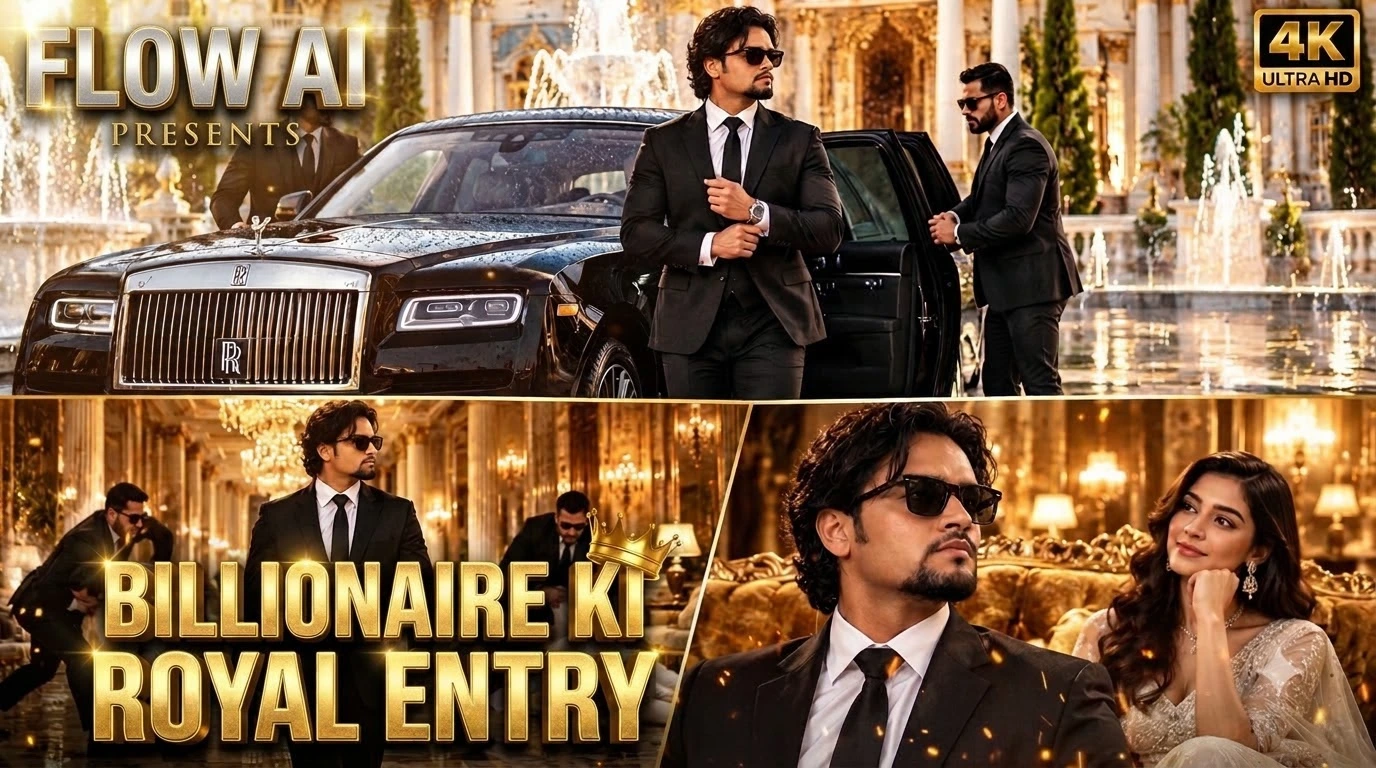
The scene begins with a black Rolls-Royce arriving at a magnificent neoclassical palace courtyard. Two security bodyguards open the rear door, allowing a stylish South Asian man in a tailored black suit to step out onto the wet marble. The sequence then moves into a golden chandelier-lit corridor, where the man walks forward confidently while his bodyguards deal with two aggressive intruders in the background. The final moment features a glamorous woman in a white designer gown watching him pass with an admiring smile.
This prompt is suitable for creators who want to develop cinematic AI videos for YouTube Shorts, Instagram Reels, Facebook Reels, and other vertical video platforms. Its visual style combines luxury fashion, expensive automobiles, royal architecture, action choreography, and polished movie-trailer cinematography.
What Makes This Luxury AI Video Prompt Special?
The prompt describes more than a luxury car and a stylish man. It gives the scene a clear progression, moving from the exterior arrival to an indoor action sequence and then to a refined character moment.
Each part contributes something different. The Rolls-Royce establishes wealth and prestige. The palace courtyard provides a grand visual setting. The bodyguards communicate security and importance, while the man's calm movements make him the central character. The corridor action adds tension, and the woman near the golden velvet sofa introduces a sophisticated social atmosphere.
These connected details help the AI video model understand the intended mood. Instead of generating a random collection of luxury objects, the prompt guides the video toward a sequence with a beginning, a middle, and an ending.
The Royal Palace and Rolls-Royce Arrival
The opening shot features a luxury black Rolls-Royce arriving in a neoclassical palace courtyard. White-and-gold marble, decorative architecture, and water fountains create a grand environment. The wet marble adds reflections beneath the car, helping the scene feel atmospheric and cinematic.
The vehicle should remain visually consistent as it arrives and stops. Its body shape, black finish, proportions, and position should not change abruptly between frames. The palace architecture should also maintain consistent lines and details.
Two elite male bodyguards in sharp black suits open the rear door. Their movements should feel controlled and professional rather than exaggerated. The main character then steps out of the vehicle and adjusts his cuffs while standing on the wet marble.
This small action is important because it gives the character a composed, confident personality. Instead of rushing or making dramatic gestures, he appears comfortable in the environment. The contrast between his calm manner and the elaborate surroundings creates the desired VIP atmosphere.
Character Styling and Visual Identity
The central character is a stylish South Asian man with medium wavy dark hair, a groomed goatee, and black Wayfarer sunglasses. His outfit consists of a tailored black suit, a crisp white shirt, and a black tie.
The dark suit creates a strong silhouette against the palace's white-and-gold marble. The white shirt provides contrast, while the sunglasses contribute to the understated, confident style.
For a more consistent result, keep the character description unchanged across the prompt and any additional generation attempts. If the chosen AI tool supports reference images, a clear character reference may help guide the hairstyle, facial appearance, and clothing. Exact identity consistency is not guaranteed, so review the generated footage carefully.
The cuff-adjusting gesture should remain subtle. Small movements are often more convincing than exaggerated gestures, especially in realistic cinematic scenes.
The Golden Chandelier-Lit Corridor
After the exterior arrival, the scene cuts to a smooth forward tracking shot inside a luxurious corridor illuminated by golden chandeliers. This change in location creates visual variety while preserving the royal atmosphere.
The main character strides forward with calm confidence, and the camera tracks his movement. The corridor should feature elegant architectural details, warm light, and a refined cinematic background. Golden highlights and soft bokeh can add depth without distracting from the subject.
Camera movement is especially important here. A steady forward tracking shot can make the viewer feel as though they are moving alongside the character. Sudden camera jumps, inconsistent walking speed, or rapidly changing corridor details may weaken the illusion of a continuous scene.
The Bodyguard Action Sequence
In the background, the two bodyguards swiftly intercept and tackle two aggressive male intruders wearing white suits. This action introduces tension while keeping the VIP character at the center of attention.
The choreography should be readable and controlled. The bodyguards need to move toward the intruders, make contact, and complete the action without unnatural body positions or sudden changes in location. The main character continues walking calmly rather than turning the entire sequence into a fight scene.
AI video models can struggle with several people moving and interacting simultaneously. Arms, legs, clothing, and contact between bodies may become distorted. If this happens, simplify the action or generate the confrontation as a separate clip. A clean edit between shots may produce a more convincing result than trying to fit every complex movement into one generation.
The scene should focus on cinematic action rather than graphic violence. Clear movement, consistent characters, and believable spacing are more important than adding excessive intensity.
The Elegant Woman and Final Close-Up
The final part features a medium close-up as the man walks past an ornate golden velvet sofa. A glamorous high-society woman in an elegant white designer gown watches him pass with an admiring smile.
This moment shifts the mood from action to elegance. The contrast between the woman's white gown, the golden sofa, and the man's black suit reinforces the colour palette of the scene.
Her expression should remain natural and subtle. A small smile and a brief glance can communicate admiration without appearing exaggerated. The main character continues his stride, maintaining the confident tone established in the opening shot.
Warm royal cinematic bokeh helps separate the characters from the background. However, facial details and clothing should remain clear enough to preserve the polished, live-action appearance.
Complete Master Video Prompt
Use the following original prompt in your AI video generation workflow:
Master Video Prompt
Cinematic 9:16 vertical 4k video, 35mm film look. A luxury black Rolls-Royce arrives at a grand neoclassical white-and-gold marble palace courtyard with water fountains. Two elite male security bodyguards in sharp black suits open the rear door. A stylish South Asian man with medium wavy dark hair, groomed goatee, and black Wayfarer sunglasses steps out in a tailored black suit, white shirt, and black tie, adjusting his cuffs on the wet marble.
Cut to a smooth forward tracking shot down a golden chandelier-lit corridor: the suited South Asian man strides with calm VIP dominance while his two bodyguards swiftly intercept and tackle two aggressive male intruders in white suits in the background.
Medium close-up as the man strides past an ornate golden velvet sofa, where a glamorous high-society woman in an elegant white designer gown watches him pass with an admiring smile. Warm royal cinematic bokeh, authentic physics, live-action realism, 24fps.
Recommended Settings for AI Video Generation
Use a 9:16 vertical aspect ratio if the final video is intended for mobile-first platforms. The prompt requests a 4K cinematic look and 24fps, but the actual resolution and frame rate depend on the capabilities and export settings of the selected AI tool.
If the generator supports separate scene generation, consider creating three clips: the Rolls-Royce arrival, the corridor tracking shot with the background confrontation, and the final shot near the golden velvet sofa. These shots can then be arranged in a video editor to create a smoother sequence.
Use consistent character and environment references where supported. Keep the same clothing descriptions, lighting direction, and visual style throughout. A negative prompt, if available, can mention unwanted results such as distorted faces, extra fingers, duplicated people, changing car designs, floating objects, inconsistent clothing, unnatural walking, and unstable camera movement.
Review the generated footage before publishing. Prompt details can guide the model, but they cannot guarantee perfect realism or exact physical interactions.
Final Thoughts
This Luxury Rolls-Royce AI Video Prompt combines a prestigious vehicle, grand palace architecture, confident character styling, professional bodyguards, a dramatic corridor sequence, and an elegant final moment. Its strength lies in the way these elements work together to create a coherent cinematic concept.
For the best results, keep each action clear, maintain consistent character details, and use smooth camera movements. If one generation struggles with the complex action, divide the sequence into separate clips and edit them together.
Whether you are experimenting with Flow AI or another compatible AI video generator, this prompt provides a detailed creative starting point for producing a luxury-themed vertical video with a polished movie-trailer aesthetic.
Flow AI Se Luxury Rolls-Royce Cinematic Video Kaise Banaye
Agar aap black Rolls-Royce, royal palace, stylish South Asian man aur professional bodyguards wali cinematic AI video banana chahte hain, to aap Flow AI mein is master video prompt ko use kar sakte hain. Is tutorial mein bataya gaya hai ki prompt kaise use karna hai, scenes ko kaise plan karna hai aur final video ko behtar banane ke liye kya check karna hai.
Step 1: Flow AI Open Karein
Sabse pehle Google par Flow AI search karein aur Google ke official Flow experience ko open karein. Zarurat padne par apne Google account se sign in karein. Available features aur generation limits aapke account aur current Flow version ke hisaab se alag ho sakte hain.
Flow mein video generation ka option select karein. Interface mein agar model, aspect ratio, reference image ya duration ke controls available hon, to apne project ke mutabik settings choose karein.
Step 2: Master Video Prompt Copy Karein
Is article ke Discussion section mein diya gaya complete Master Video Prompt copy karein. Ismein Rolls-Royce arrival, palace courtyard, bodyguards, main character, golden corridor aur elegant woman ka description shamil hai.
Prompt ko paste karne se pehle confirm karein ki poora text copy hua hai. Agar aap opening, corridor action ya final close-up ka description hata denge, to generated result original concept se alag ho sakta hai.
Step 3: Vertical Video Format Choose Karein
Agar Flow ke current interface mein aspect ratio ka option available hai, to mobile content ke liye 9:16 vertical format select karein. Prompt mein 4K cinematic look aur 24fps ka mention hai, lekin actual resolution aur frame rate tool ki supported settings par depend karega.
Agar direct 4K output available nahi hai, to highest suitable quality mein video generate karein aur export options check karein. Sirf prompt mein 4K likhne se actual output 4K hona guaranteed nahi hai.
Step 4: Pehla Scene Generate Karein
Pehle scene mein black Rolls-Royce ko white-and-gold marble palace courtyard mein aate hue dikhaya gaya hai. Do bodyguards rear door kholte hain aur South Asian man car se bahar nikal kar apne cuffs adjust karta hai.
Agar Flow ek prompt mein saare actions sahi tarah generate nahi kar raha, to is opening ko alag clip ke roop mein banayein. Prompt mein car ka slow arrival, rear door opening aur character ke calmly step out karne ka sequence clear rakhein.
Generation ke baad check karein ki car ka design consistent hai, character ki clothing sahi hai aur marble floor par reflections natural lag rahe hain.
Step 5: Golden Corridor Wala Scene Banayein
Ab doosre scene ke liye golden chandelier-lit corridor aur smooth forward tracking shot ka description use karein. Main character ko calmly aage chalte hue dikhayein.
Bodyguards aur white suits pehne intruders ki action sequence ko background mein rakhein. Agar multiple people ke movement mein distortion aa raha hai, to confrontation ko ek separate clip mein generate karne ki koshish karein.
Agar Flow mein ingredients, reference frames ya image guidance jaise options available hon, to unka use karke character aur visual style ko consistent rakhne ki koshish karein. Available controls interface ke version ke hisaab se badal sakte hain.
Step 6: Final Sofa Scene Generate Karein
Teesre scene mein man ko golden velvet sofa ke paas se guzarte hue dikhayein. White designer gown pehni woman use admiring smile ke saath dekhti hai.
Is shot mein medium close-up, warm golden lighting aur soft cinematic bokeh par focus karein. Woman ka expression subtle rakhein aur main character ke suit, hairstyle aur sunglasses ko pehle scenes ke saath match karne ki koshish karein.
Step 7: Clips Ko Arrange Karein
Agar aapne teen alag clips generate ki hain, to unhe kisi suitable video editor mein is order mein arrange karein: Rolls-Royce arrival, corridor action, aur final sofa scene.
Cuts ko action ke natural points par rakhein. Agar ek clip ka camera movement doosre se bahut alag hai, to transition ko simple rakhein. Zarurat ke mutabik clips trim karein taaki video mein unnecessary pauses na rahen.
Step 8: Quality Check Aur Editing Karein
Final video ko shuru se aakhir tak dekhein. Car ke shape, character ke face, sunglasses, suit, bodyguards ke movement aur woman ke appearance mein unwanted changes check karein.
Khaas taur par tackling scene mein body positions aur physical contact dekhein. AI-generated footage mein kabhi-kabhi limbs, facial details aur objects distort ho sakte hain. Agar problem serious hai, to us clip ko dobara generate karein ya action ko simplify karein.
Step 9: Export Aur Publish Karein
Final video ko supported vertical format mein export karein. Resolution, frame rate aur compression settings ko apne platform ke requirements ke hisaab se choose karein.
Aap video ko YouTube Shorts, Instagram Reels ya Facebook Reels ke liye use kar sakte hain. Publish karne se pehle title aur description ko scene se relevant rakhein aur platform ki AI-generated content disclosure policy follow karein, agar applicable ho.
Final Tip
Flow AI mein behtar result ke liye prompt ko clear rakhein aur har scene mein ek main action par focus karein. Agar ek hi generation mein car arrival, complex action aur final close-up sahi nahi aa rahe, to scenes ko alag generate karke edit karna ek practical approach hai. Flow ki current capabilities aur available settings ke mutabik prompt ko adjust karein.