Master AI Video Prompt: Create a Cinematic Golden Eagle Landing Scene
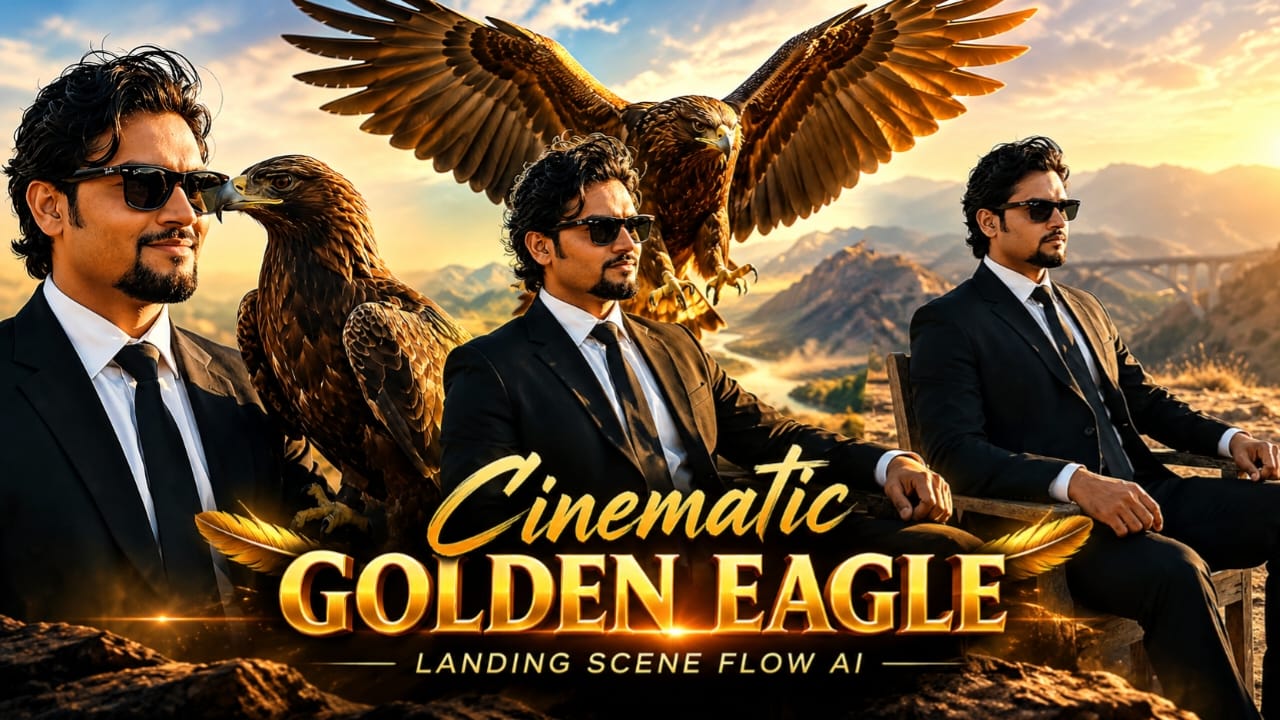
AI video generation has made it possible to create cinematic scenes that once required professional cameras, carefully planned locations, trained wildlife, and an experienced production crew. With a detailed master video prompt, creators can describe a scene, define the main character, control the camera movement, and guide the AI toward a more realistic result. This Master AI Video Prompt is designed to create a dramatic vertical video featuring a stylish South Asian man and a magnificent golden eagle landing on his outstretched arm.
The scene combines cinematic fashion, rugged outdoor scenery, realistic bird movement, and warm golden-hour lighting. It is suitable for creators who want to produce visually striking content for Instagram Reels, YouTube Shorts, Facebook Reels, and other vertical video platforms.
What Makes This Cinematic AI Video Prompt Special
The main strength of this prompt is its combination of specific visual details and a clear sequence of actions. Instead of simply asking an AI tool to generate a man with an eagle, it describes the character's appearance, clothing, location, lighting, bird movement, and camera direction.
The main character is a handsome South Asian man with wavy black hair, a groomed goatee beard, and black Wayfarer sunglasses. He wears a tailored black suit, crisp white shirt, and black necktie. His relaxed posture on a weathered wooden chair creates a confident, composed appearance.
The background adds another layer to the scene. An open dusty hill, distant mountains, and an arched viaduct bridge establish a dramatic outdoor environment. Warm golden-hour light gives the landscape a cinematic atmosphere, helping the subject and the eagle stand out from the background.
These details work together to create a polished movie-trailer aesthetic rather than an ordinary portrait animation.
The Golden Eagle Landing Effect
The central action is the eagle's arrival. A large golden eagle with a wide wingspan swoops down smoothly from the sky and lands on the man's outstretched right forearm. Its wings flap powerfully during the approach before it settles into a steady position.
This action is one of the most important parts of the video. The movement should appear continuous and physically believable. The bird needs to approach from a clear direction, adjust its wings as it descends, make contact with the arm, and settle without suddenly changing size or position.
The eagle's feathers should remain detailed throughout the sequence. Its wings, body, and talons should move naturally, while its head turns slightly as it looks sideways after landing. The man's arm should remain stable enough to support the visual action, and the eagle should not appear to float above the sleeve.
AI video models may struggle with complicated contact between two moving subjects. For this reason, a clear prompt that specifies the landing sequence can help reduce unwanted movement. Results will still depend on the capabilities of the selected model, the reference images, and the generation settings.
Character Styling and Appearance
Fashion details help establish the mood of the scene. The black suit creates a clean silhouette, while the white shirt and black tie provide contrast. Black Wayfarer sunglasses reinforce the confident, understated style.
The man's wavy black hair and groomed goatee beard should remain consistent from the beginning to the end of the video. His expression is relaxed, and he gives a subtle, confident smirk after the eagle settles on his arm.
A useful tip is to avoid adding unnecessary facial actions. Too many expressions or head movements can cause identity changes in AI-generated video. A small smile, slight head movement, and steady posture are often enough to communicate confidence.
If your AI video tool supports reference images, use a clear image of the intended character. A reference can help guide facial structure, hairstyle, clothing, and overall appearance, although exact identity consistency is not guaranteed by every tool.
Camera Movement and Cinematic Composition
The video uses a 35mm lens look and a vertical 9:16 composition. The camera begins with a medium shot, showing the seated man, his outstretched arm, the eagle's approach, and the surrounding landscape. It then slowly pushes toward a closer profile view.
This gradual movement helps the audience focus on the interaction. Starting too close could hide the eagle's flight path, while staying too far away might make the bird's feathers and the man's expression difficult to see.
A slow camera push-in also adds depth to the scene. The background mountains and bridge can remain visible while the man and eagle become the visual center. The camera should move smoothly without sudden zooms, shaking, or unnecessary angle changes.
The 35mm lens description suggests a natural cinematic perspective rather than an extreme wide-angle appearance. However, AI tools interpret lens terminology differently, so the final result may not perfectly match a real camera's optical characteristics.
Lighting, Atmosphere, and Natural Details
Golden-hour lighting is essential to the visual mood. Warm sunlight can create soft highlights on the man's suit, illuminate individual feathers, and add depth to the dusty landscape. Shadows should remain consistent with the apparent direction of the sunlight.
Natural wind adds subtle motion to the man's hair and jacket. The wind should not be so strong that his clothing becomes distorted or the scene loses its calm atmosphere. Dust and background movement can remain understated, allowing the eagle's landing to stay in focus.
The mountains and arched viaduct bridge provide a strong sense of scale. Keeping them slightly less prominent than the main subjects can create visual separation without removing the environmental context.
Realism comes from consistency as much as detail. Lighting, shadows, body proportions, feather movement, and camera direction should work together. Adding too many dramatic effects may make the scene look artificial, so a restrained cinematic approach is often more effective.
Complete Master Video Prompt
Use the following prompt as the main instruction for your AI video generator:
Cinematic 9:16 vertical video shot on 35mm lens. A handsome South Asian man with wavy black hair, groomed goatee beard, and black Wayfarer sunglasses, wearing a sharp tailored black suit, crisp white shirt, and black necktie, sitting relaxed on a weathered wooden chair outdoors on an open dusty hill. Behind him, distant mountains and an arched viaduct bridge under warm golden hour light. The man extends his right forearm calmly. A large wild golden eagle with a wide wingspan swoops down smoothly from the sky, its wings flapping powerfully as it lands steadily on his outstretched suited arm, gripping with sharp talons. Camera slowly pushes in from medium shot to close-up profile. The eagle rests calmly looking sideways, and the man gives a subtle, confident smirk. Highly detailed feathers, natural wind blowing hair and jacket, realistic physics, 24fps, cinematic movie trailer aesthetic.
Recommended Settings for Better Results
Choose a vertical 9:16 aspect ratio for mobile-first content. If your tool allows frame-rate selection, use 24fps to support the requested cinematic style. Select a video duration long enough for the eagle's approach, landing, and final close-up to remain readable. The ideal duration depends on the generator, but a short clip of approximately 6–10 seconds can be a useful starting point.
If the tool supports camera controls, select a slow push-in or gradual dolly-in. If it supports reference images, consider providing a character reference and a separate environment reference. Keep the prompt focused on the same man, the same outfit, the same eagle, and one continuous action.
Avoid adding multiple competing actions, sudden scene transitions, or unrelated objects. A negative prompt may also help if your chosen tool supports it. You can specify unwanted results such as distorted hands, extra limbs, duplicated wings, malformed talons, flickering facial features, unnatural feather motion, sudden camera jumps, and inconsistent clothing.
These instructions can guide the model, but they cannot guarantee a perfect result. Always review the generated video and adjust the prompt if the eagle's landing or the character's appearance needs improvement.
Who Can Use This Prompt
This master prompt is useful for AI video creators, cinematic content editors, social media creators, prompt designers, and beginners experimenting with text-to-video tools. It can also serve as a starting point for a larger visual project, including a short cinematic sequence, a character introduction, or a dramatic fashion video.
Creators can adapt the same structure to other scenes by changing the environment, clothing, animal, camera movement, or lighting while retaining a clear beginning, central action, and ending.
Final Thoughts
A strong AI video prompt is more than a collection of visual keywords. It describes who appears in the scene, where the action happens, how the subjects move, what the camera does, and which visual details create the intended mood.
This Master AI Video Prompt brings those elements together in a cinematic golden eagle landing scene. By clearly describing the man's appearance, the dusty hill, the distant bridge, the bird's controlled landing, and the slow camera push-in, you give the AI model a focused creative direction.
Try the prompt in a video generator that supports detailed text instructions, review the result carefully, and refine the wording according to the model's strengths. With thoughtful iteration, you can work toward a more cohesive, realistic, and visually engaging cinematic video for your next creative project.
Kaise Banaye
Master AI Video Prompt Se Cinematic Golden Eagle Video Kaise Banaye
Agar aap ek aisi cinematic AI video banana chahte hain jisme ek stylish South Asian man black suit pehenkar outdoor location par baitha ho aur ek golden eagle uske haath par aakar land kare, to aap detailed text-to-video prompt ka use kar sakte hain. Is tutorial mein aap jaanenge ki prompt ko kaise use karna hai, video settings kaise select karni hain aur final result ko behtar banane ke liye kin baaton ka dhyan rakhna hai.
Step 1: AI Video Generator Select Karein
Sabse pehle aisa AI video generator choose karein jo text-to-video generation support karta ho. Kuch tools image-to-video generation, reference images, camera movement aur additional prompt controls bhi offer karte hain.
Tool select karte waqt dekhein ki woh vertical video bana sakta hai ya nahi. Agar aapka goal Instagram Reels, YouTube Shorts ya doosre mobile platforms ke liye video banana hai, to 9:16 aspect ratio useful rahega.
Step 2: Master Video Prompt Copy Karein
Is article mein diya gaya complete Master Video Prompt copy karein. Prompt mein character ki appearance, black suit, white shirt, black tie, sunglasses, dusty hill, mountains, arched viaduct bridge aur golden eagle ki landing ka description shamil hai.
Prompt ko copy karte waqt important details remove na karein. Agar aap bird ki landing, camera movement ya character ki styling ka description hata dete hain, to generated video original concept se alag ho sakti hai.
Step 3: Video Format Set Karein
AI tool mein aspect ratio ka option available ho to 9:16 vertical format select karein. Yeh format mobile screen par full-screen cinematic video ke liye suitable hai.
Agar tool duration select karne deta hai, to aisi duration choose karein jisme eagle ka sky se approach karna, arm par land karna aur final close-up clearly dikh sake. Lagbhag 6–10 seconds ek starting point ho sakta hai, lekin best duration tool aur action ki complexity par depend karegi.
Step 4: Character Appearance Par Focus Karein
Prompt mein man ke wavy black hair, groomed goatee beard, black Wayfarer sunglasses aur tailored black suit ka clear description diya gaya hai. In details ko consistent rakhein.
Agar aapka tool reference image support karta hai, to ek clear character image upload kar sakte hain. Reference image model ko face, hairstyle aur clothing ke visual direction mein help kar sakti hai. Lekin har tool exact facial consistency guarantee nahi karta.
Agar pehli generation mein face change ho raha ho, to prompt ko aur focused banayein. Character ke appearance ko baar-baar alag wording mein describe karne ke bajaye ek consistent description use karein.
Step 5: Eagle Ki Landing Ko Clearly Describe Karein
Is video ka main action golden eagle ka man's outstretched right forearm par land karna hai. Isliye action ka sequence important hai.
Prompt mein eagle ko sky se smoothly approach karte hue, powerful wing flaps ke saath descend karte hue aur phir steadily arm par land karte hue describe kiya gaya hai. Landing ke baad eagle calmly sideways dekhta hai.
Agar bird ka movement unnatural aa raha ho, to prompt ko chhote aur clear action stages mein rewrite karein. Zarurat padne par approach, landing aur final pose ke liye alag clips generate karke editing software mein combine kiya ja sakta hai.
Step 6: Camera Movement Set Karein
Prompt mein 35mm lens look aur medium shot se close-up profile tak slow camera push-in diya gaya hai. Agar aapke tool mein camera controls hain, to slow push-in ya dolly-in option select karein.
Camera movement smooth honi chahiye. Sudden zoom, unnecessary shaking aur rapid angle changes cinematic effect ko kam kar sakte hain.
Agar camera controls available nahi hain, to camera movement ka description text prompt mein hi rakhein. AI model us instruction ko apni capability ke hisaab se interpret karega.
Step 7: Golden-Hour Lighting Aur Background Add Karein
Warm golden-hour light, open dusty hill, distant mountains aur arched viaduct bridge scene ka mood set karte hain. In elements ko prompt mein clearly mention karein.
Lighting natural aur consistent rehni chahiye. Man, chair aur eagle par shadows ek doosre se match karni chahiye. Background mein mountains aur bridge visible rahen, lekin main action se attention na hatayein.
Natural wind ka effect bhi subtle rakhein, taaki hair aur jacket mein halka movement aaye aur scene zyada lifelike lage.
Step 8: Video Generate Karein Aur Result Check Karein
Prompt paste karne ke baad video generate karein. Final output ko poora dekhkar check karein ki character ka face consistent hai ya nahi, eagle ka size natural lag raha hai ya nahi, aur bird ka arm par landing action clear hai ya nahi.
Khaas taur par wings, talons, fingers, suit sleeves aur bird ke contact point ko review karein. AI-generated videos mein in details par distortions aa sakte hain.
Agar result satisfactory nahi hai, to poora prompt har baar badalne ke bajaye ek problem par focus karein. Misal ke taur par, agar camera movement theek hai lekin eagle ki landing galat hai, to sirf landing instructions ko improve karein.
Step 9: Final Video Edit Karein
Agar generated video mein chhoti problems hain, to aap kisi video editor mein trim, crop, colour correction aur sound design kar sakte hain. Golden-hour look ko support karne ke liye warm colour grading use ki ja sakti hai, lekin skin tones aur feather details ko unnatural na banayein.
Agar cinematic music ya ambient wind sound add karna chahte hain, to scene ke mood ke hisaab se audio choose karein. Music ko itna loud na rakhein ki visual experience distract ho.
Step 10: Export Aur Publish Karein
Final video ko vertical 9:16 format mein export karein, agar yahi aapka target format hai. Export se pehle resolution, video quality aur audio check kar lein.
Social media par publish karte waqt ek relevant title aur short description use karein. Agar video AI-generated hai aur platform disclosure maangta hai, to uski policy follow karein.
Final Tip
Best result ke liye detailed prompt, consistent character description, clear action sequence aur smooth camera movement par focus karein. Har AI video tool prompt ko thoda alag tarike se interpret karta hai, isliye pehli generation ko final result samajhne ke bajaye use testing aur improvement ka starting point maanein.